

Task guide / Risen Ballbylon DLC

Risen Ballbylon recipes & evolution finder

Risen Ballbylon adds 20 evolutions built around Beast, Force, Water and Wood. Raise both ingredients to level 3, then choose their Evolution at a Fusion Reactor. Mudslide first needs the base-game evolution Landslide.

Updated 2026-11-14 · Risen Ballbylon DLC

Plan from your current balls

Recipe finder

Jump to all 20 recipes ↓

Pick the balls you currently hold. The finder stops at those ingredients and shows what is still missing.

Held does not mean level 3. Each evolution requires both current ingredients at level 3 and a Fusion Reactor. This tool does not check slots, character rules or random offers.

Choose balls you hold
Risen Ballbylon base balls
Base-game ingredients & Landslide

Mudslide from scratch

  1. Stone + Earthquake → Landslide. Raise both to level 3, then choose Landslide at a Fusion Reactor.
  2. Landslide + Water → Mudslide. Raise both to level 3, then choose Mudslide at a Fusion Reactor.

All 20 evolution recipes

20 recipes
Risen Ballbylon evolution recipes and effects
EvolutionIngredientsEffect & limits
Hedgehog ballHedgehog
Beast + BleedBoth ingredients must be level 3Adds bleed and releases spiked baby balls on impact.
Beast + EarthquakeBoth ingredients must be level 3Moves slowly, deals triple damage and damages nearby enemies every second.
Thunderbird ballThunderbird
Beast + LightningBoth ingredients must be level 3Clings to an enemy, dealing periodic damage and zapping nearby targets.
Werewolf ballWerewolf
Beast + VampireBoth ingredients must be level 3Clings and deals periodic damage until its target dies; the death can heal you.
Beast + Brood MotherBoth ingredients must be level 3Spawns with extra copies. Each copy attaches to an enemy and damages it every second until that enemy dies.
Bullet ballBullet
Force + IronBoth ingredients must be level 3Pierces enemies; its initial damage bonus falls with successive hits to a minimum.
Gale ballGale
Force + WindBoth ingredients must be level 3Launches enemies into the air; they take damage on landing.
Misfortune ballMisfortune
Force + DarkBoth ingredients must be level 3Its first hit deals multiplied damage and curses all enemies, then destroys the ball.
Force + EarthquakeBoth ingredients must be level 3Damages enemies in a square area and briefly knocks them into the air, letting balls pass underneath.
Waterfall ballWaterfall
Force + WaterBoth ingredients must be level 3Its impact creates a temporary damaging waterfall and destroys the ball.
Rot ballRot
Water + WoodBoth ingredients must be level 3Adds damage based on current enemy health, then disappears; has a firing cooldown.
Siren ballSiren
Water + CharmBoth ingredients must be level 3Pierces enemies with a chance to charm each target it hits.
Steam ballSteam
Water + BurnBoth ingredients must be level 3Pierces enemies and leaves a brief trail that deals damage over time.
Water + EarthquakeBoth ingredients must be level 3Passes through enemies and damages a large area, but is destroyed when it hits a field edge.
Water + Brood MotherBoth ingredients must be level 3Births one baby ball each time it hits an enemy.
Landslide + WaterBoth ingredients must be level 3First: Stone + Earthquake → LandslideCreates a mudslide on enemy impact and destroys itself. The mudslide damages and slows enemies in its radius for a few seconds.
Ash ballAsh
Wood + BurnBoth ingredients must be level 3Pierces enemies and leaves a short ash trail that applies stacking burn.
Fruit ballFruit
Wood + CellBoth ingredients must be level 3Heals you if it returns, but disappears after hitting a limited number of enemies.
Ironwood ballIronwood
Wood + IronBoth ingredients must be level 3Deals nearby area damage that grows with hits, up to a cap.
Wood + PoisonBoth ingredients must be level 3Applies ivy stacks that deal damage every second. At maximum stacks, it consumes all stacks to damage every nearby enemy.

How to evolve the new balls

  1. Get access to the expansion

    Own and install Risen Ballbylon, and complete the base game to open its content. The four new base balls are Beast, Force, Water and Wood; the other direct ingredients below already belong to the base game.

  2. Choose a pair and upgrade both balls

    Use the table or finder below to choose your target. Obtain both listed ingredients during the run and choose their repeat level-up upgrades until both are level 3. Holding a ball alone does not meet the level requirement.
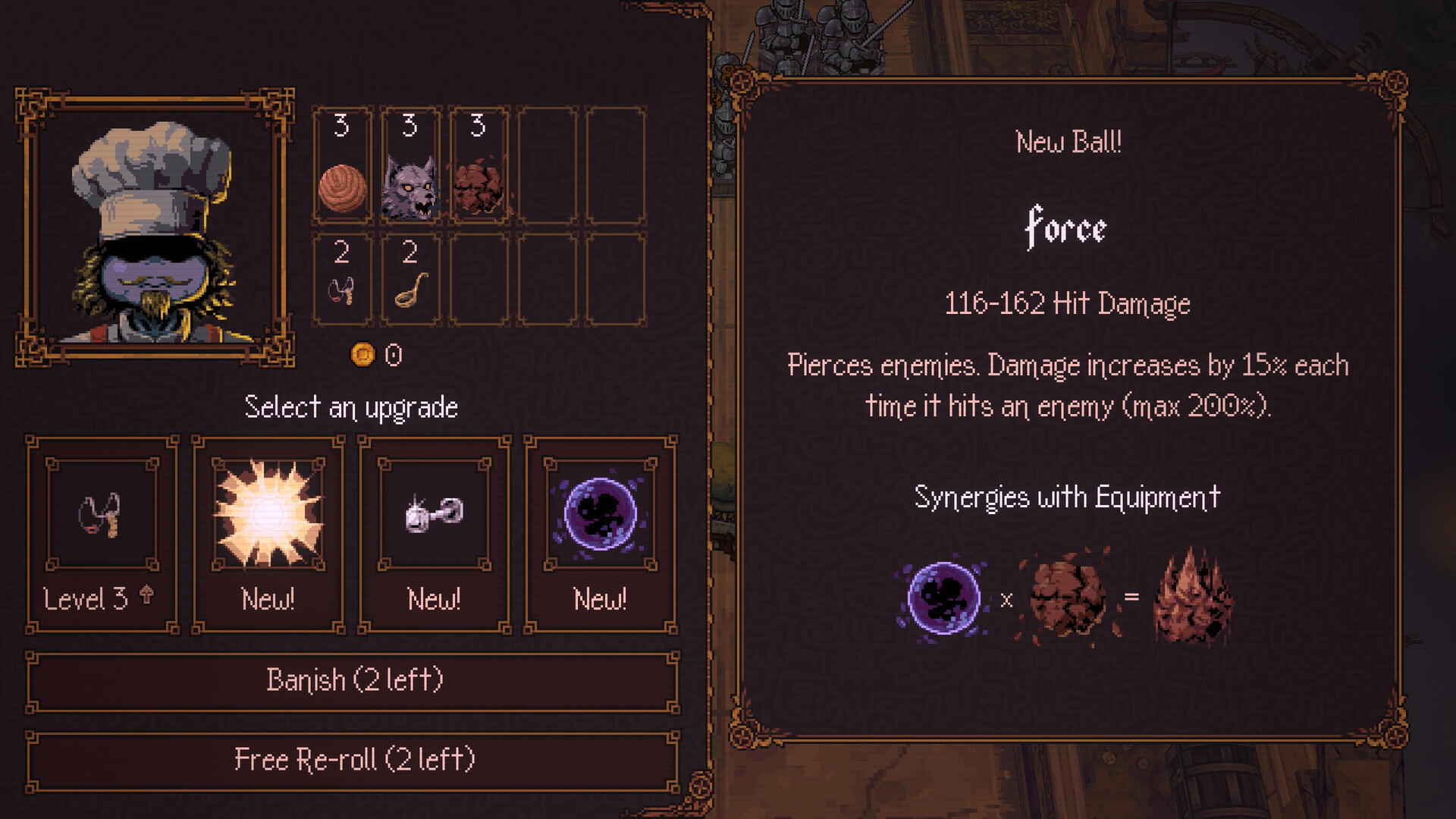
    Official BALL x PIT Select an upgrade screen with the new Force ball offered among upgrade choicesOpen full-size image ↗
    Official DLC upgrade-screen example. Force is offered as a New Ball; this is not proof of level 3, a Reactor selection or a guaranteed offer in every run.
  3. Check the offered ball’s name

    Read the ball’s name in the offer panel before choosing it. In the official example, the panel says New Ball: Force. You still need repeat upgrades to bring each chosen ingredient to level 3.

    Official offer panel labelled New Ball: Force in BALL x PITOpen full-size image ↗
    A second crop of the same official example shows New Ball: Force. It identifies the offered ingredient, not a completed evolution.
  4. Select the Evolution

    Pick up a Fusion Reactor when one drops. Choose the named Evolution from the available options. A compatible evolution pair is not an ordinary mixed fusion; look for the target name. If building Mudslide from scratch, make Landslide from Stone + Earthquake, then raise Landslide and Water to level 3 for Mudslide.

What success looks like

The chosen target appears as your evolved ball. For Mudslide, the finished target is Mudslide, not its intermediate ingredient Landslide.

If it does not work

If the target is missing, recheck the exact pair, both current ingredient levels and DLC access. A missing ingredient still needs to be obtained during the run; this finder cannot guarantee random offers, reactor timing or character-specific slot legality.

Next steps

Browse all new balls →

Sources & scope

For the Risen Ballbylon expansion released November 12, 2026.

Game artwork © Kenny Sun / Devolver Digital. Steam interface example © Valve. This is an independent fan guide.